Authentication
All API requests require authentication via an API key passed in the Authorization header.
| Header | Value | Required |
|---|---|---|
| Authorization | your_api_key | Yes |
| Content-Type | application/json | Yes |
Where to get your API key
You can generate your API key from your account dashboard.
-
Log in to your Apper account
-
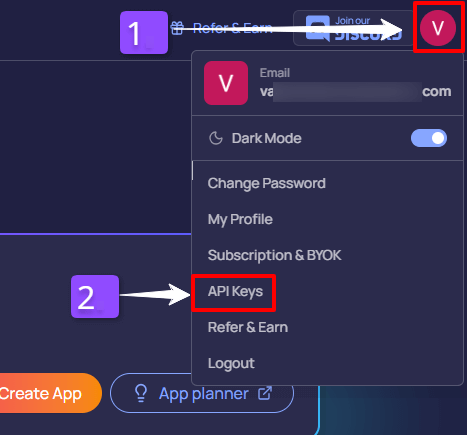
Click your Profile icon (top-right)
-
Select API Keys
-
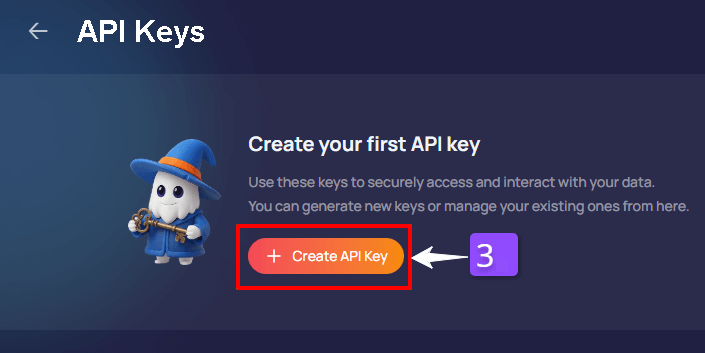
Click “+ Create API Key.”
-
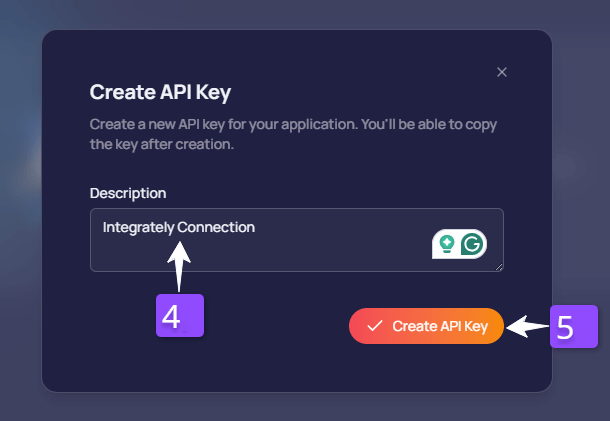
Add a Description so you can remember what it’s used for (example:
Integrately connection) -
Click Create API Key
-
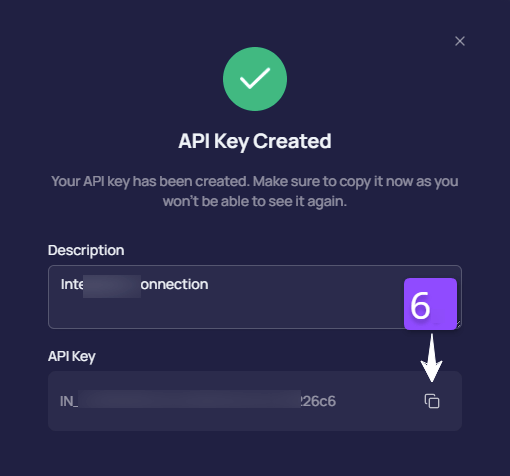
Copy the API key (you’ll use it in Integrately)
Test Authentication
Verify your API key works:
GET
https://api.apper.io/v1/auth/me
Curl :
curl --location 'https://api.apper.io/v1/auth/me'
--header 'Authorization: {your_api_key}'
--header 'Content-Type: application/json'
Response
If you get this response, you're authenticated successfully!
{
"name": "John Doe",
}